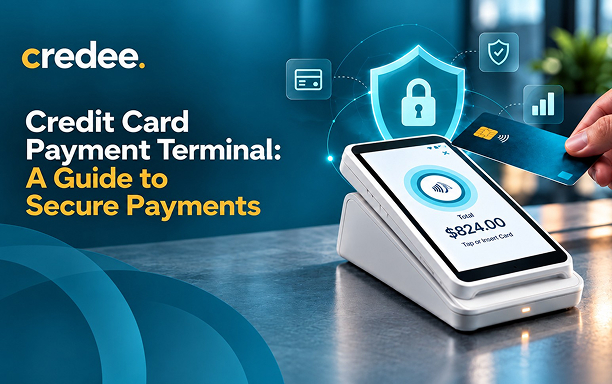
A customer taps a card, the screen confirms the payment, and the sale is approved in seconds. During that brief interaction, the credit card payment terminal captures payment data and uses the device's and processing solution's security mechanisms to protect it. Meanwhile, the transaction request travels through the payment processing network to the customer's card issuer, which approves or declines the payment.
That small device does a lot of work. Most Americans now prefer to pay in person with cards. According to Pew Research Center analysis of Federal Reserve data, in 2025, 78% preferred a credit or debit card for in-person purchases, while only 16% preferred cash. Every one of those payments depends on a terminal that is fast, reliable, and secure.
This guide explains what a credit card payment terminal is and how a transaction moves from tap to payout. It also covers the security features that protect each sale and how to choose the right terminal for your business.
| Key Takeaways - Credit card payment terminals accept payments through chip cards, contactless cards, digital wallets, and, where supported, magnetic stripes. - Transactions typically involve the terminal, payment processor, card network, and issuing bank. - EMV chip technology, encryption, tokenization, and appropriate security controls help protect payment information. - The right terminal depends on your transaction volume, business environment, payment needs, and integration requirements. - Smart terminals can combine payment acceptance with additional business tools. |
What Is a Credit Card Payment Terminal?
A credit card payment terminal allows businesses to accept electronic payments in person. It reads supported payment methods and securely communicates transaction information through a payment processing system for authorization.
Depending on the setup, it may also support different checkout workflows.
- EMV chip cards: Customers insert their cards into the chip reader.
- Contactless cards: Customers tap compatible cards to pay.
- Digital wallets: Supported devices accept payments from wallets such as Apple Pay and Google Pay.
- Magnetic-stripe cards: Some terminals support swipe payments where permitted.
- QR-code payments: Certain systems support QR-based payment methods.
A terminal may operate independently or connect with a point-of-sale (POS) system, business software, or a payment platform.
Payment Terminal vs. Card Reader vs. POS System
| Feature | Card Reader | Payment Terminal | POS System |
|---|---|---|---|
| Primary Function | Captures card data (tap, dip, swipe) | Processes and authorizes payment transactions | Manages overall business, sales, and operations |
| Main Components | Compact hardware (connects to phone or tablet) | Card slot, keypad/screen, optional printer | Software + hardware (tablet, cash drawer, scanner, reader) |
| Inventory Tracking | No | No (or very basic) | Yes (full stock and item tracking) |
| Sales Analytics & Reports | No | Minimal (transaction logs) | Detailed revenue, tax, and employee reports |
| Best Suited For | Markets, mobile vendors, or very small startups | Quick counter checkouts needing fast card processing | Retail stores, restaurants, and growing businesses |
These terms sometimes overlap. For example, a smart terminal may combine payment acceptance with selected POS features.
A Credit Card Payment Terminal, Close Up: The Parts That Matter
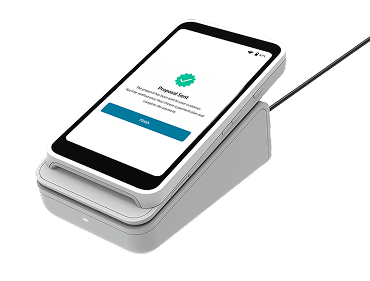
A terminal's design varies by model, but common components include:
- Display: Shows transaction amounts, instructions, and payment status.
- Chip reader: Reads the chip on compatible payment cards.
- Contactless reader: Accepts supported tap-to-pay cards and devices.
- Keypad or touchscreen: Lets customers or staff enter amounts, PINs, or other required information.
- Connectivity components: Connect the device to the payment processing system through supported network connections.
- Security features: Depending on the device, these may include tamper protections and certified payment security capabilities.
When choosing a terminal, check that the hardware supports your required payment methods and is appropriate for your payment environment. In addition, confirm that its security features meet your business requirements.
How a Credit Card Payment Terminal Transaction Works, Step by Step
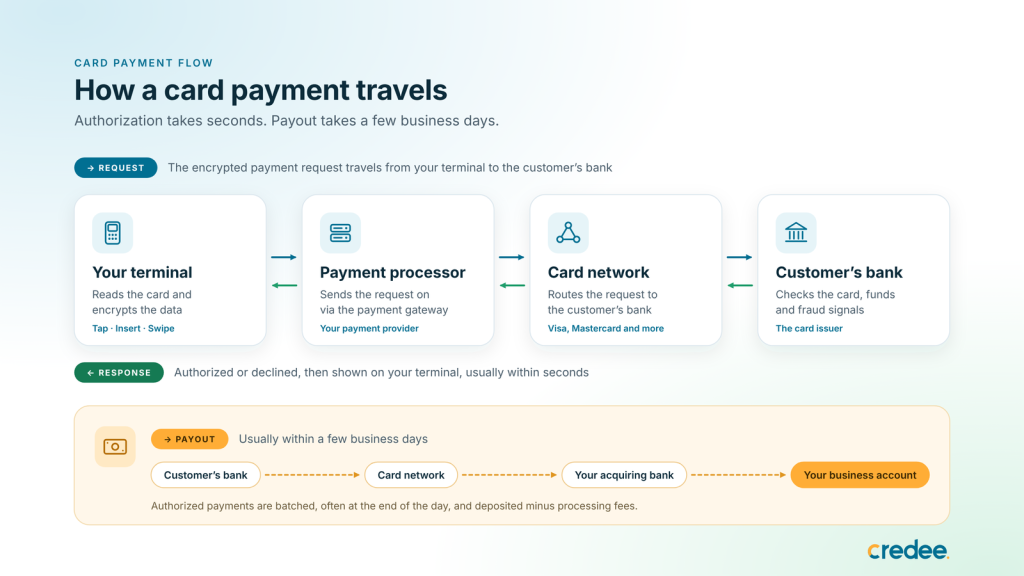
A credit card payment terminal transaction looks instant at the counter, but it involves several handoffs. To understand the process, here's what happens between the tap and the money reaching your account.
1. Entering the Amount: You input the total purchase amount into the terminal.
2. Presenting the Payment: The customer taps a contactless card or digital wallet, inserts a chip, or swipes their card.
3. Terminal secures the data. The terminal immediately encrypts the sensitive card information to ensure it travels safely without exposure.
4. Request goes to the processor. The encrypted data travels through a payment gateway to your payment processor.
5. Card network routes it. The processor passes the request to the card network. The network sends it to the customer's bank.
6. Issuing bank responds. The customer's bank checks the card, the available funds or credit limit, and fraud signals. Based on these checks, it authorizes or declines the payment.
7. The terminal shows the result. The response travels back the same way, usually within seconds. As a result, the customer gets a printed or digital receipt.
8. Settling the Funds: At the end of the business day, the system batches approved transactions. The funds (net of processing fees) are then transferred directly into your merchant bank account.
Types of Credit Card Terminals
Choosing the right credit card terminal can speed up checkout, improve the customer experience, and simplify your daily operations. To help you compare the options, here is a comparison of the main payment terminal types for your business setup.
| Terminal type | How it works | Best for |
|---|---|---|
| Countertop terminal | Sits at a fixed checkout and usually connects by Ethernet or Wi-Fi; many include a receipt printer | Retail counters, front desks, cafés |
| Portable (wireless) terminal | Handheld device that connects over Wi-Fi, Bluetooth, or cellular | Pay-at-table restaurants, salons, clinics with several rooms |
| Mobile card reader | Small reader that pairs with a smartphone or tablet app | Pop-ups, markets, food trucks, field services |
| Smart POS terminal | Touchscreen, app-based device that combines payments with POS software | Businesses that want payments and software in one device |
| Self-service kiosk | Customers order and pay on their own. | High-traffic counters, quick service, ticketing |
| Virtual terminal | Software for keying in card details from a computer, with no card present | Phone and mail orders |
A quick note on virtual terminals: because the card isn't physically present, these payments carry more fraud risk and usually cost more to process than chip or tap payments.
How Credit Card Payment Terminals Help Protect Transactions?
Payment security requires a combination of appropriate hardware, payment technology, software, and business procedures. However, no terminal alone can eliminate every fraud risk.
1. EMV Chip Technology
EMV chip cards use chip-based security technology to support authentication during compatible transactions. EMV technology helps reduce certain types of counterfeit-card fraud compared with magnetic-stripe-only transactions.
The EMV liability shift took effect in the United States in October 2015. Under applicable card-network rules, liability for certain counterfeit-card transactions may fall on the party that has not adopted the required EMV technology. Merchants should confirm the rules that apply to their payment setup.
2. Contactless Payments and Digital Wallets
Contactless cards and supported digital wallets allow customers to pay by tapping a card or device. Depending on the payment method and device, security features may include transaction cryptograms, tokenization, and customer authentication.
For example, compatible digital wallets may use device-specific tokens instead of sharing the underlying card number with the merchant. Authentication requirements vary by wallet, device, and transaction.
3. Encryption and Tokenization
Encryption helps protect payment information as it moves through supported parts of the payment environment. Point-to-point encryption (P2PE), when implemented through an appropriate validated solution, can help protect card data from the point of interaction to a secure decryption environment.
Similarly, tokenization replaces sensitive card data with a substitute value for supported uses, such as recurring payments. This can reduce the amount of sensitive card information stored in business systems.
Businesses should confirm which protections their terminal and payment provider actually support.
Explore our guide to choosing the right payment terminal for your business.
Security Best Practices for Merchants
Use these practices to strengthen payment security:
- Choose suitable hardware with the appropriate PCI PTS approval or listing.
- Confirm whether your provider offers validated P2PE or other supported encryption protections.
- Inspect terminals for signs of tampering or unexpected attachments.
- Keep terminal software and firmware updated per your provider’s guidance.
- Restrict access to payment systems and use strong account security.
- Avoid storing sensitive card data unless a valid, compliant business need exists.
- Follow applicable PCI DSS requirements and your payment provider's instructions.
Security responsibilities can vary by payment setup. Therefore, confirm the requirements that apply to your business with your processor and the relevant standards.
How to Choose the Right Credit Card Payment Terminal?
Evaluate these factors before purchasing or upgrading a terminal. For instance, consider your required payment methods, business environment, processing costs, and integration needs.
1. Payment methods: Check support for chip, contactless, digital wallets, and any additional methods your customers need.
2. Business environment: Choose countertop, portable, mobile, or smart hardware based on where transactions take place.
3. Processing and integration: Confirm compatibility with your processor, POS, business software, and reporting needs.
4. Security: Look for appropriate approvals, supported encryption protections, tamper safeguards, and regular security updates.
5. Costs: Compare hardware prices, processing fees, connectivity charges, software costs, and support fees.
6. Customer experience: Look for a clear interface, dependable connectivity, and a checkout flow that suits your customers.
7. Support and scalability: Consider troubleshooting support, warranty coverage, and whether the solution can grow with your business.
A good terminal should fit your business operations while making payments convenient for customers. Ultimately, the best choice balances security, functionality, and cost.
How Credee Terminal Can Support Your Business?
A terminal that only takes card payments covers one part of checkout. With Credee Terminal businesses can bring in-person payments together with additional payment options and business tools.
- Accept chip, contactless, and digital wallet payments at the counter or on the go
- Offer flexible payment plans and subscriptions for larger purchases and ongoing services
- Send payment links by email or SMS, or share a QR code, so customers can pay from their own phone
- Receive eligible pay-in-full payouts within 30 minutes
- Automate reviews, rewards, and referrals after checkout
- Manage transactions, users, and terminal settings in the Credee Business Panel
- Connect the terminal to existing Credee workflows
If you want to explore how the Credee Terminal fits your checkout process, book a demo to discuss your business requirements.
Final Thoughts
A credit card payment terminal is an important part of a reliable checkout experience. The right solution helps businesses accept customer payments efficiently while supporting appropriate payment security and operational needs.
Before selecting a terminal, compare payment methods, security capabilities, integration options, total costs, and support. By doing so, you can choose a solution that fits your workflow and creates a smoother experience for customers and staff.
Frequently Asked Questions
Q. What is a credit card payment terminal?
A credit card payment terminal is a device that accepts supported card and digital payments and sends transaction information through a payment processing system for authorization.
Q. How does a credit card payment terminal transaction work?
The terminal reads the payment method, sends an authorization request through the processing system, receives an approval or decline response, and displays the result. Settlement follows according to the payment arrangement.
Q. Are credit card payment terminals secure?
Security depends on the terminal, payment solution, configuration, and business practices. EMV technology, supported encryption, tokenization, appropriate hardware controls, and software updates can help protect transactions.
Q. What is the difference between a card reader and a payment terminal?
A card reader primarily captures payment credentials and often works with another device. A payment terminal generally provides a more complete payment interface and may process transactions independently, depending on the model.
Q. Can a credit card payment terminal accept contactless payments?
Many modern terminals support contactless cards and compatible digital wallets. Check the device specifications and payment provider requirements to confirm compatibility.
Q. How do I choose the right terminal for my business?
Consider payment methods, transaction volume, checkout environment, security requirements, processing costs, software integrations, and customer support.