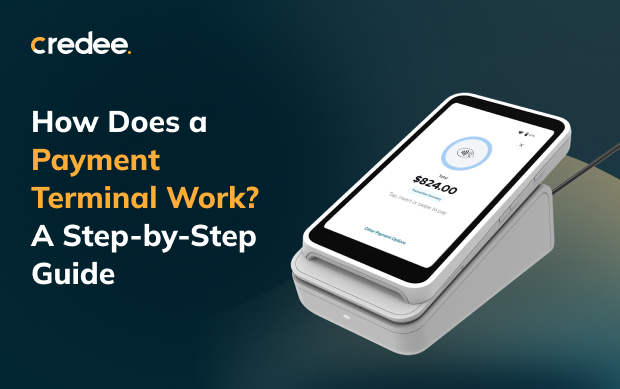
Every time a customer taps, chips, or swipes at your counter, your payment terminal processes a series of events in the background. It has a few seconds to complete the transaction—or you risk losing the sale.
Ever wondered how does a payment terminal works? It’s simple. Your terminal securely connects the customer’s card or phone to your payment processor and their bank. All this happens in a few seconds—before you even hand over the receipt.
For business owners, understanding how payment terminals work isn't technical trivia. It impacts your checkout speed, fraud risk, and cash flow. It also affects how much revenue you lose when a payment fails.
This guide explains how payment terminals work, step by step. You will also see what modern terminals can do beyond basic payments.
What Is a Credit Card Terminal?
A credit card terminal reads payment details and sends them for approval. It also goes by the name POS terminal. Today's devices do more than swipe cards. They handle chips, tap-to-pay, QR codes, and digital wallets like Apple Pay.
This matters more than ever. Globally, 70% of in-person Mastercard payments are contactless. If your terminal can't keep up with how people actually want to pay, you're competing with one hand tied behind your back.
What Does a Payment Processing Terminal Do?
At its core, a payment terminal does three simple things:
- Reads your customer's payment details.
- Sends the information to get approval.
- Confirms if the sale went through.
But the role has expanded well beyond that. Modern terminals also:
- Accept multiple payment types in one device (card, contactless, digital wallet, QR)
- Encrypt and tokenize sensitive data to reduce fraud exposure
- Generate digital or printed receipts and transaction records
- Support tipping, splitting payments, or setting up recurring charges
- Feed transaction data into accounting, CRM, or reporting systems
Make Every Transaction Smarter
Discover how one Smart Checkout Terminal can streamline payments, boost conversions, and keep revenue flowing.
Explore More →How Does a Payment Terminal Work? The Step-by-Step Process
Here's what actually happens during a transaction, from tap to approval:
▶ The customer pays. The customer swipes, inserts, or taps a card. They can also tap a phone or smartwatch.
▶ The terminal secures the data. The terminal reads the card info and locks it with a secret code. Contactless payments use a new code for every sale. This keeps the real card number safe.
▶ The terminal sends the data. The terminal sends the locked info to a payment processor. This processor acts as the middleman to the bank networks.
▶ The card network checks the request. The processor sends the details to Visa, Mastercard, or another card network. The network then contacts the customer's bank.
▶ The bank approves or denies the sale. The customer's bank checks for available funds and signs of fraud. In 1 to 3 seconds, the bank sends back a yes or no.
▶ The terminal displays the results. The screen shows if the payment worked or failed. If approved, it prints or sends a receipt.
▶ You get your funds. The funds go into your bank account. This usually takes 1 to 3 days, but some modern terminals offer instant payouts to help your cash flow.
Benefits of a Payment Processing Terminal for Businesses
➡ Faster checkouts. Tap and chip payments take seconds. This keeps lines moving fast.
➡ Better security. Modern chips and secret codes protect card data. This reduces your risk of fraud.
➡ Fewer lost sales. Almost half of customers leave if they cannot use their preferred payment method. A modern terminal lets you accept every payment type.
➡ Easier funds tracking. Digital records update automatically. You track sales easily and get paid.
➡ More business insights. Today's terminals connect to marketing, loyalty programs, and reports. Every sale helps grow your business.
| Did You Know? 7 in 10 POS terminals are contactless-enabled. SOURCE: Mastercard |
Benefits of a Payment Processing Terminal for Customers
▶ Fast and easy. Tap-and-go convenience with zero extra steps at checkout.
▶ More ways to pay. Customers can use cards, digital wallets, or QR codes instead of carrying cash.
▶ Stronger security. Tap-to-pay uses single-use secret codes. Your real card number is never shared or saved.
▶ Clear records. Digital receipts list all item details. This stops confusion and prevents payment disputes later.
Types of Payment Processing Terminals
Not all payment processing terminal hardware works the same way. Broadly, businesses choose between:
1. Traditional countertop terminals — wired or Wi-Fi connected, built for a fixed checkout counter
2. Mobile/portable terminals — battery-powered, used for curbside, delivery, or field sales
3. Smart terminals — full point-of-sale terminals that combine payment processing or marketing tools on one screen
That last category is where the terminal conversation is heading. A device that only processes payments is now the baseline expectation, not the differentiator.
A Closer Look: The Credee Terminal
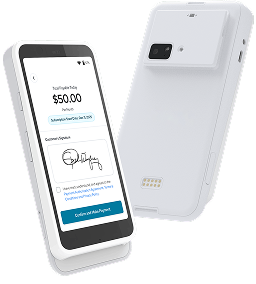
If you're evaluating what a smart terminal should actually include, the Credee Terminal is a useful reference point for where the category is headed. A few highlights:
➡ Flexible payments. Accepts 50+ global payment methods, including tap, chip, swipe, QR codes, and digital wallets.
➡ Instant payouts. For pay-in-full transactions, funds land in the business's bank account almost immediately.
➡ Gap coverage on payment options. If a customer's first payment option covers only part of the cost, the system turns the rest into a payment plan. This helps you complete the sale.
➡ Checkout in the customer's language. Customers can view payment steps, agreements, and options in their preferred language, like English, Spanish, French, or Chinese.
➡ Automated post-sale marketing. After a transaction clears, the terminal prompts for a star rating or video testimonial, surfaces a QR code for a social follow, or delivers a referral reward automatically.
➡ Built for the counter. Features all-day battery life, fast USB-C charging, auto-updates, and built-in security to protect card data.
| What Business Owners Are Saying About Credee Terminal Credee Terminal flipped the script on how we collect reviews. As soon as a customer finishes paying, it asks them for a quick star rating or video review right on the screen. We’ve landed more positive Google reviews in the last three months than we managed to get in an entire year before this. - Elena Thorne, Operations Director, Home Services The gap coverage feature on the Credee Terminal has been an absolute game-changer for our treatment acceptance rates. Before, if a patient applied for payment options and were approved for only $1,500 of a $2,500 procedure, they’d usually panic and walk away. Now, Credee automatically sets up a custom payment plan for that remaining $1,000 right on the spot. We don't lose the patient; they get the care they need, and the entire sale still closes seamlessly. - Dr. Aris, Owner, Dental Clinic |
The Bottom Line
At its core, the payment terminal process is a rapid, encrypted handoff between your customer, your hardware, and the banking system — usually completed in seconds. But the terminals worth investing in today do more than move that handoff along. They reduce the odds of a lost sale, give customers more ways to pay, and turn a completed transaction into the start of a repeat-customer relationship rather than the end of the interaction.
Understanding how payment terminals work is the first step. The next is asking whether the one at your counter is actually built for how your customers want to pay — and what happens in your business the moment after they do.
FAQs
Q: What is a credit card terminal?
A credit card terminal is a tool used to accept card payments. It is also called a POS terminal.
Q: How does a payment terminal work?
A payment terminal is a specialized transaction device that acts as a secure bridge between a buyer and the banking system. When a customer taps, swipes, or inserts a card, the device reads the details. It turns sensitive data into a safe code. Then, it sends the code to check for available funds.
Q: What is the main function of a payment processing terminal?
Its main job is to collect payment details safely. It sends that data to the bank for approval. Next, it shows if the payment went through. Modern devices also handle extra tasks. They can add tips, email receipts, and send records to your sales software.