Payment processing systems are essential for businesses that accept electronic payments through credit cards, debit cards, digital wallets, or bank transfers. These systems connect your business with payment processors, card networks, and financial institutions to authorize transactions and transfer funds securely.
For small businesses, choosing the right payment processing system can directly affect transaction costs, cash flow, and the overall customer checkout experience.
This guide explains how payment processing systems work, what they actually cost, which features matter most, and how to set one up. It ends with a checklist you can use to compare providers side by side.
| Key takeaways ➮ A payment processing system connects your business, your customer's bank, the card networks, and your own bank to approve a payment and deposit the money. ➮ The real cost includes interchange, network fees, the processor's markup, and any monthly, hardware, or add-on fees. ➮ Common payment processing pricing structures include flat-rate, interchange-plus, tiered, subscription-based, and volume-based pricing. The most suitable option depends on transaction volume, business needs, and the provider's fee structure. ➮ The best payment processing systems for small businesses support multiple payment channels, provide transparent reporting, and simplify recurring billing and payment management. ➮ Setting up a payment processing system involves comparing providers, reviewing pricing and contract terms, completing verification, connecting payment channels, and testing transactions. |
What are payment processing systems?
A payment processing system combines hardware, software, and financial partners that lets a business accept electronic payments. It validates a payment, gets it approved by the customer's bank, and sends the funds to the business.
For example, a dental practice may use a payment terminal to collect payments at the front desk, an online payment link to collect deposits, and an automated billing system to manage installment payments. Although these functions serve different purposes, an integrated payment processing system can help manage them through a centralized platform.
The term often covers several connected parts. Knowing what each one does makes it easier to compare quotes.
| Component | What it does |
|---|---|
| Payment terminal or POS | The device or app where the customer taps, inserts, or swipes a card or uses a digital wallet. |
| Payment gateway | Securely passes payment details from your checkout (online or in person) to the processor. |
| Payment processor | Routes the transaction to the card network and returns the approval or decline. |
| Merchant account or acquirer | The bank relationship that receives card funds on your behalf before they reach your business account. |
| Card networks | Visa, Mastercard, American Express, and Discover set the rules and connect banks. |
| Issuing bank | The customer's bank, which approves or declines the payment. |
Many modern providers bundle the gateway, processor, and merchant account into one service instead of three.
How do payment processing systems work?
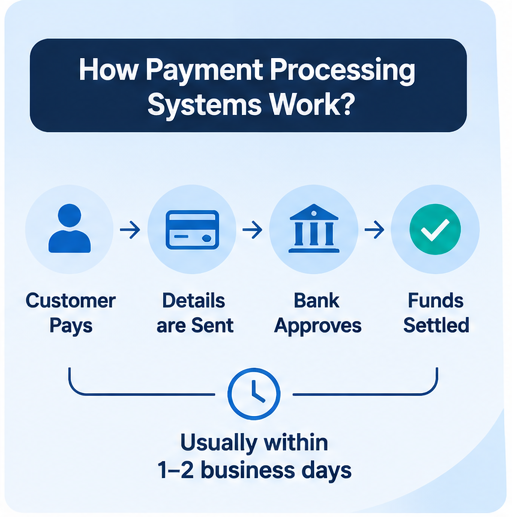
Every card payment goes through two stages: authorization (is this payment approved?) and settlement (moving the money). Here is what happens behind a single sale:
➮ The customer pays. They tap, insert, or swipe a card, use a digital wallet such as Apple Pay or Google Pay, or enter card details online.
➮ The details are protected and sent. The terminal or checkout encrypts the card data and sends it through the gateway to the processor.
➮ The processor routes the request. It forwards the transaction to the right card network.
➮ The issuing bank decides. The customer's bank checks available funds and fraud signals, then approves or declines.
➮ The answer comes back. The approval or decline returns to your terminal or checkout, usually within a few seconds.
➮ The money settles. Approved transactions are submitted for settlement, and the funds move through the payment network and acquiring bank. After applicable fees and adjustments, the remaining balance is deposited into your business bank account.
➮ Online payments follow the same path. The only difference is that the customer's details are entered on a checkout page or payment link instead of a physical terminal.
Types of payment processing systems
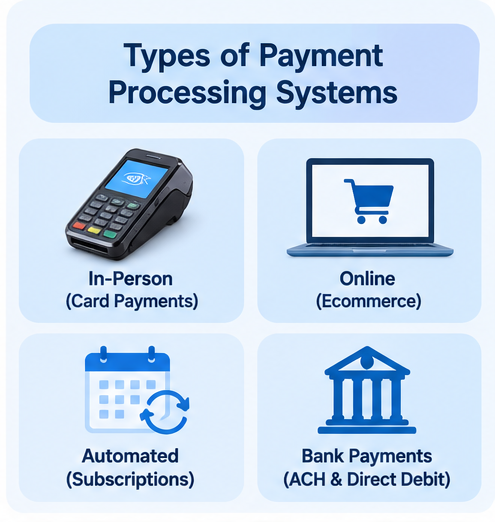
Most small businesses use a mix of the following.
1. Card payment processing systems for in-person sales
Card payment processing systems handle in-person payments. Options range from simple mobile card readers and tap-to-pay on a phone to countertop terminals and smart POS terminals with a touchscreen and built-in apps. Look for EMV chip and contactless support as a minimum.
2. Online payment processing
For e-commerce, bookings, and remote billing, online processing uses hosted checkout pages, embedded payment forms, payment links sent by text or email, and virtual terminals for taking card details over the phone.
3. Automated payment processing systems
Automated payment processing systems take repetitive work off your team. They charge saved cards on a schedule, run subscriptions and memberships, collect payment plan installments, retry failed payments, and send receipts automatically. For any business with repeat customers, automation is where most of the time savings come from.
4. Bank payments (ACH and direct debit)
Bank-to-bank payments usually cost less than cards and work well for invoices and recurring billing. The trade-off is slower settlement and less familiarity for some customers at checkout.
5. Unified (omnichannel) systems
For small businesses that accept payments through multiple channels, an omnichannel approach can reduce manual reconciliation and provide a more consistent view of sales, refunds, and customer transactions. Before choosing one, check whether the provider actually synchronizes payment data across all supported channels.
6 Payment Methods For Small Businesses To Increase Revenue
Read MoreHow much do payment processing systems cost?
Every card transaction carries several layers of fees. Understanding them is the only reliable way to compare providers.
➮ Interchange fees: Generally established by card networks and paid to the customer's issuing bank. They vary depending on card type, transaction method, and other factors. Online and manually keyed transactions may carry different interchange rates than physical card transactions.
➮ Network (assessment) fees: Small fees charged by the card networks themselves.
➮ Processor markup: The additional amount charged by your payment provider. Depending on the provider and agreement, this component may be negotiable.
➮ Other fees: Monthly or platform fees, hardware purchase or lease, PCI compliance fees, chargeback fees, instant payout fees, and early termination fees.
| Pricing model | How it works | Best for | Watch out for |
|---|---|---|---|
| Flat-rate | One percentage plus a fixed fee per transaction, regardless of card type | New or low-volume businesses that want simple pricing | Can cost more as your volume grows |
| Interchange-plus | Actual interchange passed through, plus a fixed markup | Growing businesses with steady volume | Statements are more detailed and harder to read |
| Tiered | Transactions sorted into qualified, mid-qualified, and non-qualified rates | Businesses that prefer categorized pricing, provided the qualification criteria and rates are transparent | The actual cost depends on transaction qualification criteria and the rates assigned to each tier |
| Subscription | Monthly fee plus a small per-transaction cost | High-volume businesses | Monthly fee hurts in slow months |
| Volume-based | Rate drops as monthly processing volume grows | Businesses expecting growth | Check how and when the lower rate is applied |
Features that matter most for small businesses
Price matters, but the wrong features cost more over time. Prioritize these:
➧ In-person and online in one system. One dashboard, one payout, and one set of reports.
➧ Security and compliance. EMV chip support, encryption, tokenization, and PCI DSS compliance protect both you and your customers.
➧ Payment methods your customers use. Cards, contactless, digital wallets, and, where it makes sense, bank payments.
➧ Automation. Recurring billing, subscriptions, payment plans, automatic receipts, and failed-payment retries.
➧ Reporting and integrations. Daily sales, payouts, refunds, and fees, plus connections to your accounting, booking, or CRM software.
➧ Reconciliation and transaction visibility. Look for detailed transaction histories, searchable payment records, refund tracking, and downloadable statements that make it easier to match payments with your accounting records.
➧ Payout speed. Know the standard settlement time and whether faster payouts cost extra.
➧ Fraud and chargeback tools. Automatic fraud screening and a clear process for handling disputes.
➧ Customer retention tools. Few systems go beyond the transaction. Built-in review requests and loyalty programs help turn one-time buyers into repeat customers.
➧ Fair contract terms. No long lock-ins, clear cancellation terms, and responsive support.
➧ Connectivity. Check whether a terminal runs on Wi-Fi, Ethernet, or cellular, and plan for a backup if your internet drops.
➧ Offline payment capabilities. If your business operates in areas with unreliable internet connectivity, check whether the terminal supports offline transaction functionality and understand its security and processing limitations.
➧ Scalability. Choose a system that can accommodate higher transaction volumes, additional locations, new payment channels, and changing billing requirements as your business grows.
Best payment processing systems: how leading providers compare
There is no single best payment processing system for every business. The right choice depends on where you sell, how much you process, and what you need beyond the transaction. Here is how widely used providers are positioned.
| Provider | Known for | Pricing approach | Good fit for |
|---|---|---|---|
| Stripe | Developer-friendly payment platform supporting online and in-person transactions, with integrations and payment methods that vary by market. | Standard transaction-based pricing, with custom pricing options for eligible businesses. | Online-first businesses and companies building custom checkout flows. |
| Square | POS hardware and software in one ecosystem. | Transaction-based pricing, with rates depending on the payment method and business plan. | Retail stores, cafés, and small shops selling in person and online. |
| PayPal | Widely recognized checkout and fast setup. | Transaction-based pricing, with additional charges potentially applying to international and currency-conversion transactions. | Ecommerce businesses that want to launch quickly. |
| Adyen | Enterprise-focused payment platform offering omnichannel processing and local acquiring capabilities across supported markets. | Interchange-plus or custom enterprise pricing. | Large, multinational businesses. |
| Helcim | Transparent pricing with no long-term contracts. | Interchange-plus. | Cost-conscious small businesses in the US and Canada. |
| GoCardless | Bank-to-bank payments for recurring billing. | Per-transaction bank payment pricing. | Subscription and invoice-based businesses. |
| Credee Terminal | Smart payment terminal combining card acceptance, flexible in-house payment plans, recurring billing, review requests, and customer loyalty features. | Volume-based pricing, subject to applicable monthly processing volume and current pricing terms. | Service businesses that want payments and customer retention in one device. |
This comparison provides a general overview of leading payment providers, not a direct pricing ranking. Actual costs, features, payment methods, and eligibility vary by country, transaction type, business size, and provider agreement. Compare total processing costs, hardware requirements, payout timelines, contract terms, and integrations before making a decision.
Where does Credee Terminal fit
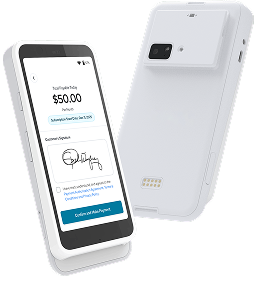
Credee Terminal brings multiple payment options and customer engagement features together in one smart device. This centralized solution helps businesses manage more of the payment journey through a single interface.
➧ Payment Processing: Accept 50+ payment methods in person via Credee Terminal or remotely using payment links, QR codes, SMS, and email.
➧ Flexible Payment Plans: Offer customizable options that help customers pay in manageable monthly installments.
➧ Upfront Financing: Receive full upfront payouts on qualifying sales, or split transactions into hybrid plans when customers qualify for partial amounts.
➧ Subscriptions & Recurring Billing: Automate memberships, repeat billing, and renewals without manual intervention.
➧ Customer Engagement & Retention: Drive repeat business and referrals with integrated review collection, rewards programs, and customer loyalty tools.
Credee Terminal uses Stripe S700 hardware and Stripe payment infrastructure to support its payment acceptance capabilities.
For businesses looking beyond basic transaction processing, Credee Terminal combines payment acceptance with tools designed to support customer engagement and retention.
How do SMBs set up payment processing systems?
Setting up a payment processing system usually takes days, not weeks. Follow these steps:
➮ Map how your customers pay: Tally sales across in-person, online, and recurring channels, along with your average ticket size and monthly volume.
➮ Shortlist 2–3 providers: Request all-in pricing in writing, and calculate your projected effective rate using current statements.
➮ Scrutinize the contract: Check contract length, cancellation or early termination fees, hardware purchase vs. lease terms, and standard payout schedules.
➮ Submit verification documents: Gather your business registration, tax ID, ownership details, ID verification, and voided business check for payouts.
➮ Configure hardware and integrations: Connect your terminals, set up hosted checkouts or payment links, and sync your POS with your accounting software.
➮ Automate repeat workflows: Turn on recurring billing, installment plans, digital receipts, and customer engagement tools like automated reviews or rewards.
➮ Test transactions and train staff: Process a live test sale and refund. Walk your team through daily checkout operations and edge cases like declines.
➮ Audit performance monthly: Track processing fees, decline rates, chargebacks, and payout speeds against your projections to ensure your provider still fits your volume.
The bottom line
Choosing the right payment processing systems requires more than comparing transaction rates. Small businesses should evaluate processing costs, accepted payment methods, automation capabilities, security, reporting, and payout timelines before deciding. The right solution should simplify payment management while supporting the business as it grows. For businesses looking beyond basic transaction processing, Credee Terminal combines card acceptance, flexible payment plans, subscriptions, review requests, and loyalty features in one solution.
See How Credee Can Simplify Your Payments.
Schedule a Demo Today!Frequently asked questions
Q. What are payment processing systems?
Payment processing systems are combinations of hardware, software, and financial services that allow businesses to accept electronic payments, including credit cards, debit cards, digital wallets, and bank transfers.
Q. How do payment processing systems work?
Payment processing systems work by securely capturing payment details, sending transaction requests through a payment processor and card network, and obtaining authorization from the customer's issuing bank. Once approved, transactions move through settlement before funds are deposited into the business's bank account.
Q. What is the best payment processing system for a small business?
The best payment processing system depends on your business size, monthly transaction volume, sales channels, and customer payment preferences. Small businesses with lower transaction volumes may prefer straightforward flat-rate pricing, while growing businesses may benefit from interchange-plus or volume-based pricing. Businesses that accept in-person and online payments should also consider integrated reporting, recurring billing, and payment automation features.
Q. How much do card payment processing systems cost?
Card payment processing systems typically charge a combination of interchange fees, card network fees, and processor markups. Additional costs may include monthly platform fees, terminal expenses, chargeback fees, and optional services. Compare providers using your effective processing rate rather than advertised transaction rates alone.
Q. What is an automated payment processing system?
An automated payment processing system charges customers on a schedule without manual work. It handles recurring billing, subscriptions, payment plan installments, receipts, and retries for failed payments.
Q. What is the difference between a payment processor and a payment gateway?
A payment gateway securely captures and passes payment details from your checkout. A payment processor routes the transaction to the card network and returns the approval. Many providers now offer both in one service.
Q. How long does it take to set up a payment processing system?
The setup time depends on the provider, business verification requirements, hardware delivery, and software integrations. Some businesses can begin accepting payments within a few days, while more complex integrations or underwriting requirements may take longer.
Q. Can one system handle in-person and online payments?
Yes. Many modern providers support in-person, online, and recurring payments on one platform with a single dashboard, which simplifies reporting and reconciliation.


